This portfolio site
A professional portfolio designed, built and maintained in WordPress — rebuilt from scratch using Twenty Twenty-Five and the Full Site Editor, with a multilingual EN/DE structure, GDPR compliance, accessibility to WCAG 2.1 AA, and an evolving plugin stack managed independently.
Solo project · Self-initiated · Ongoing
Type
- Solo Project
- Self-initiated
My Role
- Design
- WordPress build
- CMS Manager
Platform
- WordPress
- Twenty Twenty-Five
- Full Site Editor (FSE)
Status
- Live – v2 rebuild
- Ongoing management
Overview – live site
This portfolio is both the work and the proof of the work. It has gone through one full version and is currently being rebuilt as version two.
Version History
V1 – V2
Version 1
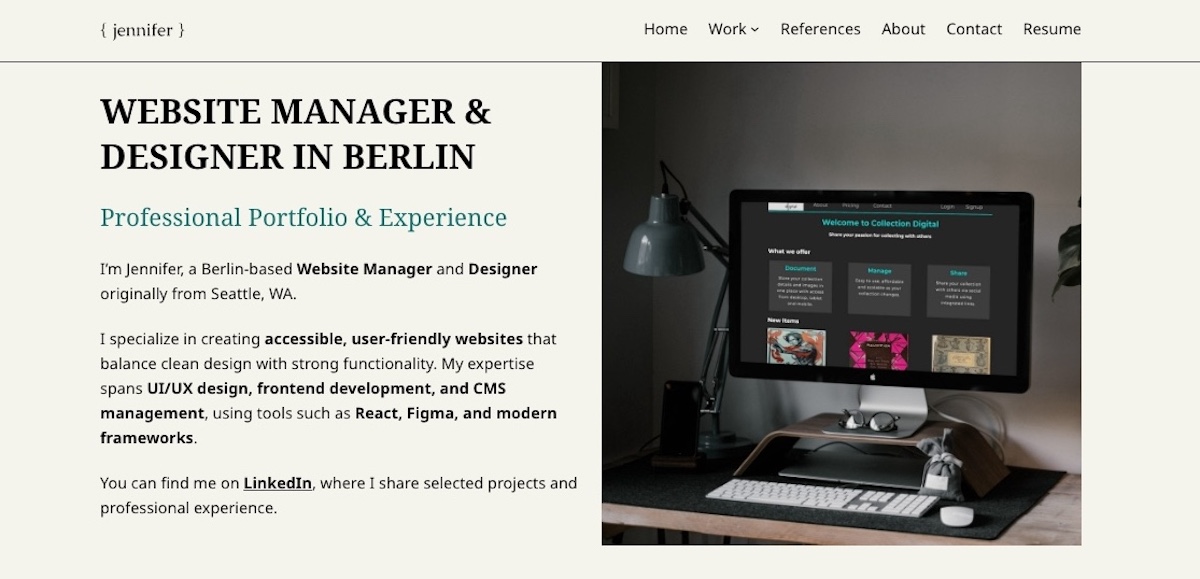
Riverbank theme
- Classic theme + Customizer
- Custom CSS overrides
- Single language (EN)
- Monsterinsights analytics
- Basic plugin stack
Version 2 – Live
Twenty Twenty-Five
- Full Site Editor
- Block templates + patterns
- EN/DE via Polylang
- Site Kit by Google
- Expanded plugin stack
The move from Riverbank to Twenty Twenty-Five is a deliberate decision to work with WordPress’s current direction — Full Site Editing is where the platform is heading and demonstrating FSE skills is directly relevant to CMS management roles. The rebuild also introduces a bilingual EN/DE structure using Polylang, reflecting both the Berlin market and a genuine technical skill.
Design Decisions
Structure and visual direction
V1 – Riverbank
V2 – Twenty Twenty-Five
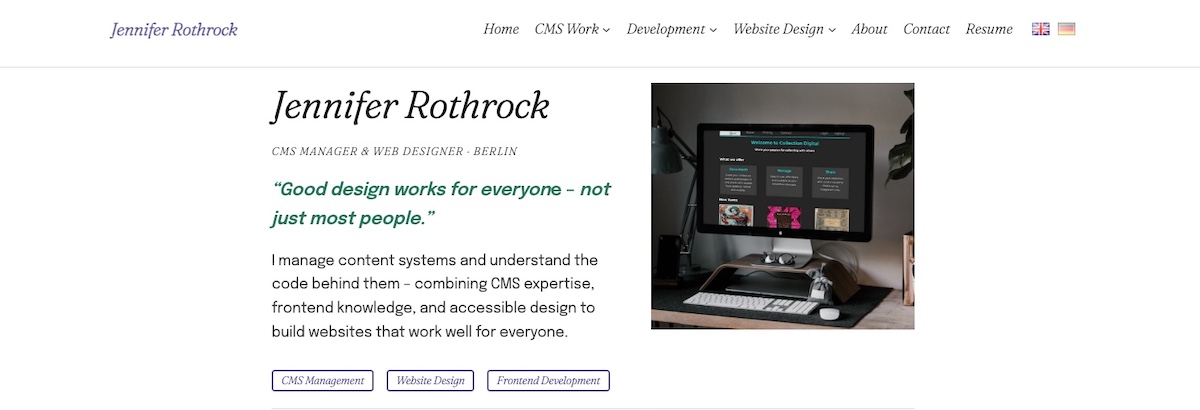
Visual comparison — v1 Riverbank vs. v2 Twenty Twenty-Five
- Three-pillar navigation structure — CMS Work, Website Design, Development — reflecting the primary skill sets rather than generic section labels
- Custom colour palette — muted purple, forest green accent, light grey and dark grey — set as named tokens used consistently across all templates
- Typography: Fraunces & Epilogue — selected font pairing applied globally through Styles, replacing Twenty Twenty-Five’s default system fonts
- Three page templates built in the Site Editor — Home, Pillar page (shared across three sections), Project page (shared across all case studies)
- Synced patterns for repeated elements — project card, references block, meta strip — built once and reused across pages
Plugin Stack
Chosen tools and why
Polylang
EN/DE multilingual structure — language pairs connected per page, language switcher in header via block
Site Kit by Google
Analytics, Search Console and PageSpeed Insights in the dashboard — monitors performance and search visibility
WPConsent
GDPR-compliant cookie consent — required for Germany, configured before any tracking scripts load
WP Mail SMTP
Ensures contact form emails deliver reliably — prevents messages going to spam via proper SMTP routing
WPForms Lite
Contact form with subject selector and honeypot spam protection — integrated with WP Mail SMTP
PDF Case Study
Inline summary with a link to view or download the PDF — fully accessible, no third-party viewer.
Smush
Image compression and lazy loading — portfolio sites are image-heavy, Smush keeps load times fast
Rank Math SEO
On-page SEO, meta management, sitemaps, and Polylang integration enabled for multilingual SEO
Each plugin was chosen for a specific purpose — nothing installed without a clear reason. The stack is deliberately lean: 12 plugins covering security, SEO, performance, legal compliance, forms, content display, analytics and multilingual structure.
CMS Structure
How the site is managed
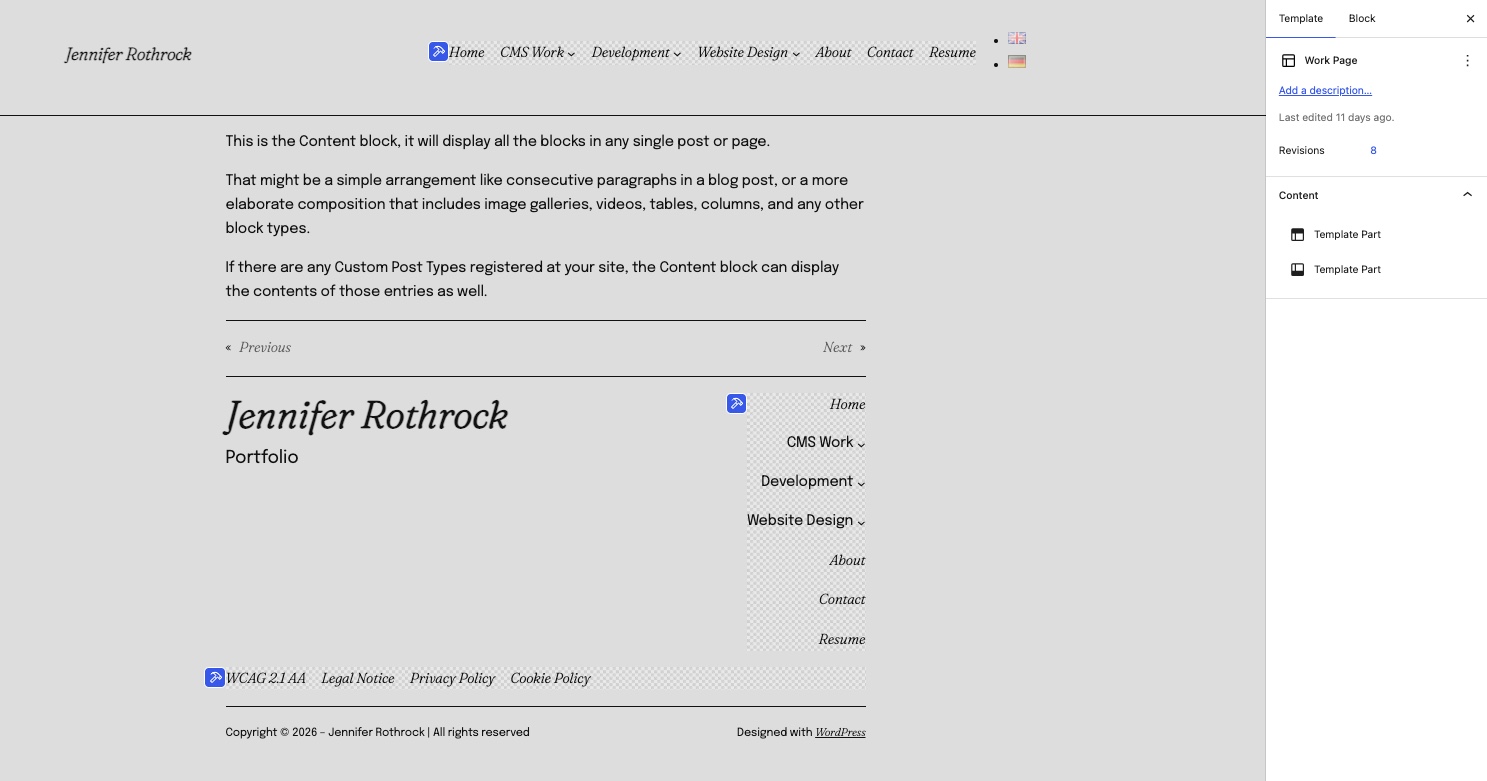
Page Template structure
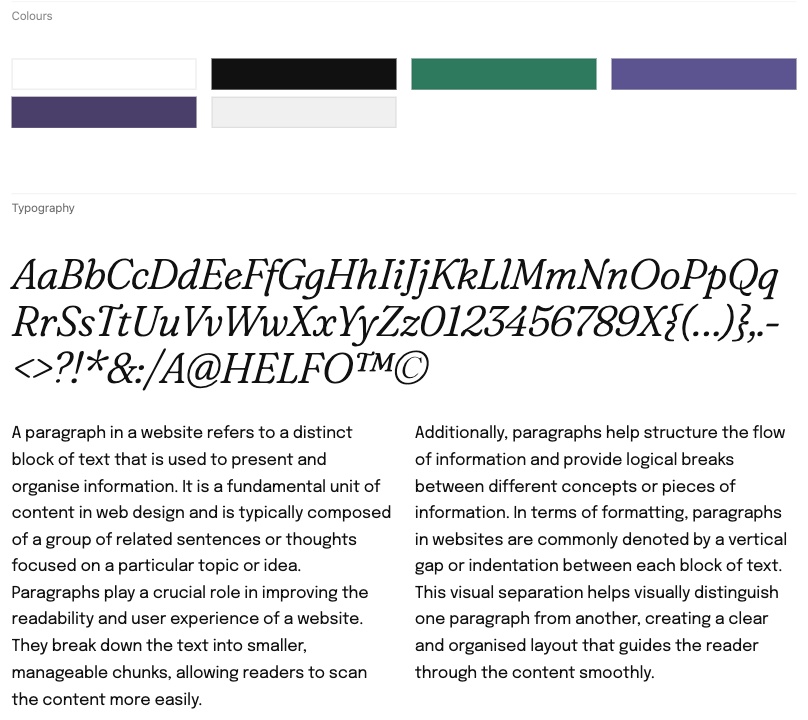
Site Editor Style book
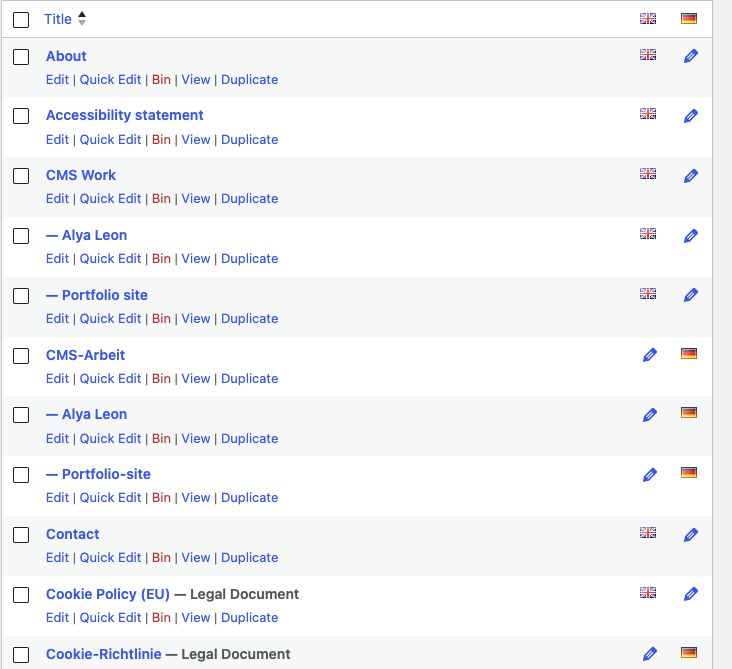
Polylang language management
- Global styles set in the Editor Design/Styles panel — colour palette, typography, spacing applied once and inherited everywhere
- Header and footer built as Template Parts — edited once, updates across all pages automatically
- Polylang language pairs connected at page level — every EN page has a corresponding DE page, language switcher block in the header
- Rank Math + Polylang integration enabled manually — multilingual SEO requires a specific configuration step, not automatic
- WPConsent configured before any other scripts — cookie consent must be established before analytics or tracking loads, a legal requirement in Germany
Accessibility
WCAG 2.1 AA throughout
Accessibility is not a feature added at the end — it is a constraint that shaped decisions throughout the build. The site carries a WCAG 2.1 AA compliance statement in the footer, backed by deliberate choices at every level.
- Skip to main content link in the header — keyboard users can bypass navigation without tabbing through every menu item
- Semantic HTML throughout — headings in logical order, landmark regions (main, nav, footer) used correctly in block templates
- Colour contrast ratios checked against WCAG 2.1 AA — all text and interactive elements pass at all sizes
- All images have descriptive alt text — not filename-based defaults, written descriptions of what is shown
- Keyboard navigation tested — all interactive elements reachable and operable without a mouse
Performance
PageSpeed Results
_
Performance
PageSpeed Desktop
_
Accessibility
PageSpeed Score
_
Best Practices
PageSpeed Score
_
SEO
PageSpeed Score
Performance is monitored via Site Kit by Google, which surfaces PageSpeed Insights scores directly in the WordPress dashboard. Image compression via Smush with lazy loading enabled, WP Super Cache for page caching, and the lightweight Twenty Twenty-Five base theme keep load times fast without a CDN.
Ongoing Management
A live, maintained CMS environment
The portfolio is updated regularly — new projects added, existing case studies refined, plugin updates managed, performance monitored. It is not a completed build but an ongoing CMS management responsibility. Every decision made on this site is the same kind of decision a CMS manager makes in a professional environment — what to update, what to leave, how to maintain quality over time.